AstroCAN BD-1 Logics

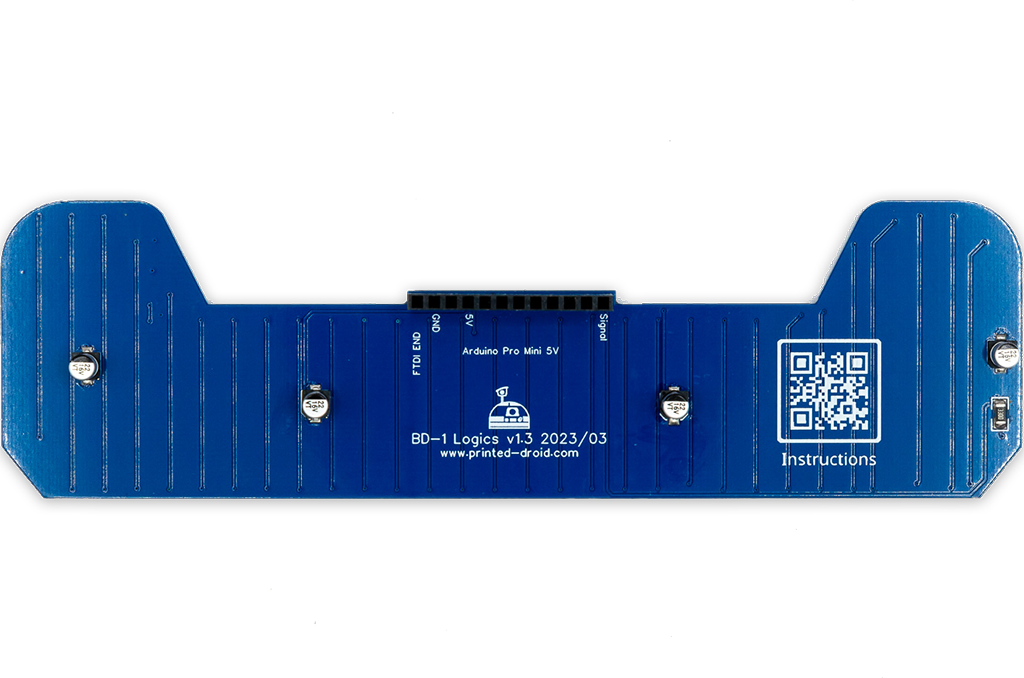
ESP32-C3-Super Mini or Arduino Pro Mini (depends on version)
| Hotspot | Function | Description |
|---|---|---|
| 1 | ESP32-C3-SuperMini or Arduino Pro Mini | ESP32-C3-SuperMini or Arduino Pro Mini Connector, depending on the version of your board. |
Use serial terminal to connect via USB (see above) to AstroCAN-Module. If your browser supports “Web Serial”, you also can use the terminal available in the Firmware section. Communication speed ist 115200 baud. The following commands are available for configuration and management:
| Command | Parameters | Description | Example |
|---|---|---|---|
| /HELP | – | shows usage | /HELP |
| /SETTINGS | – | shows all settings stored in EEPROM | /SETTINGS |
| /WIFIAPSSID | AP SSID | sets the access point SSID | /WIFIAPSSID R2TOCH |
| /WIFIAPPASSWORD | AP Password | sets the access point password | /WIFIAPPASSWORD R2TOUCH123 |
| /WIFISSID | WIFI SSID | sets the WLAN SSID | /WIFISSID HOMELAN |
| /WIFIPASSWORD | WIFI Password | sets the WLAN Password | //WIFIPASSWORD HOMELAN123 |
| /PAIR | – | auto pair module with ESP-NOW peer (connect both modules to CAN for pairing) | /PAIR |
| /NOWLMK | 16 byte key | sets the local master key for ESP-NOW communication. See -> ESP-NOW encryption for details. | /NOWLMK 0123456789ABCDEF |
| /NOWPMK | 16 byte key | sets the primary master key for ESP-NOW communication. See -> ESP-NOW encryption for details. | /NOWPMK 0123456789ABCDEF |
| /NOWCHANNEL | Channel | sets the ESP-NOW channel number | /NOWCHANNEL 5 |
| /NOWSETPEER | MAC Address in xx:xx:xx:xx:xx:xx format | set ESP-NOW communication peer MAC address | /NOWSETPEER 01:23:45:67:89:AB |
| /NOWCLEARPEERS | – | clear all ESP-NOW communication peers | /NOWCLEARPEERS |
| /NOWLISTPEERS | – | list all ESP-NOW communication peers | /NOWLISTPEERS |
| /RESTART | – | restart module | /RESTART |
| /FACTORY | – | set factory settings and restart module. All EEPROM settings will also be set to default. | /FACTORY |
| /ACTIVATE | CAN|CAN1|CAN2|NOW|WIFI|ENC | acticate CAN-/NOW-/WIFI-Functionality or ESP-NOW encryption. CAN1/CAN2 only available on Dual-CAN-Boards. | /ACTIVATE CAN |
| /DEACTIVATE | CAN|CAN1|CAN2|NOW|WIFI|ENC | deacticate CAN-/NOW-/WIFI-Functionality or ESP-NOW encryption. CAN1/CAN2 only available on Dual-CAN-Boards. | /DEACTIVATE CAN |
| /ANIMATION | number | set animation type | /ANIMATION 4 |
| /SPEED | milliseconds | set animation speed (not persistent!) | /SPEED 100 |
| /BRIGHTNESS | 0-255 | set global brightness | /BRIGHTNESS 35 |
| /RNDBRIGHTNESS | 0|1 | (de)activate random pixel brightness. Each pixel has individual brightness if active | /RNDBRIGHTNESS 1 |
| /COLOR | colorname | set base color, valid color names: blue red yellow green purple pink cyan orange lime magenta white random | /COLOR blue |
| /COLORRGB | R(0-255) G(0-255 B(0-255) | set base color as RGB value | /COLOR 0 0 255 |
| /MINLEDS | 0-255 | minimum number of active LEDs | /MINLEDS 10 |
| /MAXLEDS | 0-255 | maximum number of active LEDs | /MAXLEDS 80 |
| /SPARKS | 0-255 | fire effect sparks parameter | /SPAKRS 40 |
| /COOL | 0-255 | fire effect cool parameter | /COOL 50 |
Use serial terminal to connect via USB (see above) to AstroCAN-Module. Communication speed ist 115200 baud. The following settings can be configured (see command set above):
| Setting | Description | Example | Config Command |
|---|---|---|---|
| MAC | MAC Address of ESP32 | 12:34:56:78:9A:BC | fix, not configurable |
| AP_SSID | Name of the access point network, the AstroCAN module opens up to get connected by apps like R2-Touch | R2TOUCH | /WIFIAPSSID |
| AP_Password | Password of the Access point network. | R2TOUCH123 | /WIFIAPPASSWORD |
| WLAN_SSID | Name of the WLAN the AstroCAN module can connect to, to be controlled by other systems within that network | HOMELAN | /WIFISSID |
| WLAN_Password | Password of the WLAN the AstroCAN module can connect to. | HOMELAN123 | /WIFIPASSWORD |
| NOW_PMK | ESP-NOW encryption parameter: Primary Master Key. See -> ESP-NOW encryption for details.
Only change, if you exactly know, what you are doing! | 0123456789ABCDEF | /NOWPMK |
| NOW_LMK | ESP-NOW encryption parameter: Local Master Key. See -> ESP-NOW encryption for details.
Only change, if you exactly know, what you are doing! | 0123456789ABCDEF | /NOWLMK |
| NOW_Channel | WIFI channel to be used for ESP-NOW communication. All ESP-NOW peers have to communicate over the same channel number | 5 | /NOWCHANNEL |
| CAN1_Active | Shows, if main CAN bus is active | true – activated false – deactivated | /ACTIVATE CAN /ACTIVATE CAN1 /DEACTIVATE CAN |
| CAN2_Active | Shows, if secondary CAN bus is active | true – activated false – deactivated | /ACTIVATE CAN2 /DEACTIVATE CAN2 |
| NOW_Active | Shows, if ESP-NOW is active | true – activated false – deactivated | /ACTIVATE NOW /DEACTIVATE NOW |
| WIFI_Active | Shows, if WIFI is active | true – activated false – deactivated | /ACTIVATE WIFI /DEACTIVATE WIFI or WIFI jumper |
| NOW_Encryption | Shows, if ESP-NOW encryption is active. See -> ESP-NOW encryption for details. | true – activated false – deactivated | /ACTIVATE ENC /DEACTIVATE ENC |
| Peers | Description | Example | Configuration |
| Peer | MAC-Adress of ESP-NOW communication partner, not used in bridge module | 12:34:56:78:9A:BC | /NOWSETPEER |
| REAR_ANIM | Current animation type | 1 | /ANIMATION |
| REAR_BR | Global display brightness | 35 | /BRIGHTNESS |
| REAR_RNDBR | Individual pixel random brightness | true | /RNDBRIGHTNESS |
| REAR_R | Base color, red value | 0 | /COLOR or /COLORRGB |
| REAR_G | Base color, green value | 0 | /COLOR or /COLORRGB |
| REAR_B | Base color, blue value | 255 | /COLOR or /COLORRGB |
| REAR_MINLEDS | Minimum number of active LEDs | 10 | /MINLEDS |
| REAR_MAXLEDS | Maximum number of active LEDs | 80 | /MAXLEDS |
| FIRE_SPARKS | Fire effect sparking parameter value | 50 | /SPARKS |
| FIRE_COOL | Fire effekt cooling parameter value | 40 | /COOL |
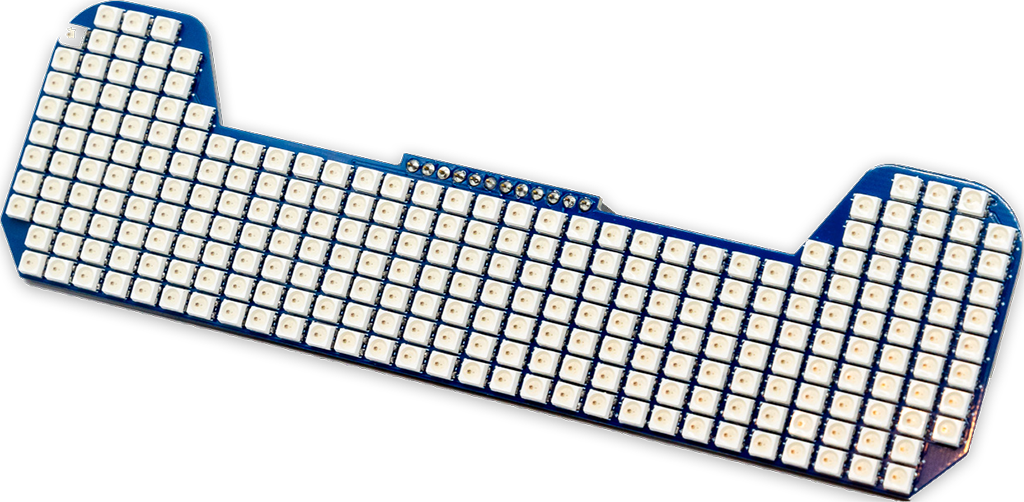
The AstroCan BD1-Logics board is designed for Michael Baddeleys BD-1. It fits the head and is controlled via a piggyback Arduino Pro mini or via any other microcontroller. It has 251 3535 RGB Leds.
The ESPNow system is exclusively utilized for connecting the body/head and dome. It efficiently transfers all CAN signals and one serial interface between the dome/head and body through ESPNow.
REAR_ANIM: 4
REAR_SPEED: 10
REAR_BR: 50
REAR_RNDBR: true
REAR_R: 0
REAR_G: 0
REAR_B: 255
REAR_MINLEDS: 3
REAR_MAXLEDS: 75
FIRE_SPARKS: 40
FIRE_COOL: 40
To install most recent firmware V2.5.0 connect the module via USB to your computer and click on “Connect” button.
Attention 1: When upgrading one module to V2.x, you have to upgrade ALL other Modules to V2.x!
Attention 2: Read HowTo – Upgrade to V2.5 before upgrading!
The firmware has been compiled using esptool, ready to flash to offset 0x00.
Firmware AstroCAN-BD1-Logics download
Read HowTo – Upgrade to V2.5 before upgrading!
Features
Bugfixes
Features
Bugfixes